FYI. Without the web gpu turned on, I have sliced and generated G code for the chess piece, loaded the gcode into UGS and gsender and run on my cnc machine, both the rotary and the linear. Seems to run correctly, still not cutting wood.
Looks like your GPU isn’t working with the browser, maybe you need to update the GPU driver.
I have an old Nvidia GeForce RTX 2070 with current drivers.
I have heard that intel GPU’s are not always supported and also some AMD’s have issues.
Check if hardware GPU is supported on your setup.
setup of browser (chromium based) has a setting: “Use graphics acceleration when available”, this should be on.
I tried to run on an older Windows 10 PC and an older Windows 10 laptop with web asm and web gpu turned on, when I slice the object, I get an “Error: Failed to initialize WebGPU”
Not the same results as my new Windows 11 PC.
what is your step down value?
I’ve tried 1 and 2, same results
I have an Intel HD Graphics 530 adapter, have “Use graphics acceleration when available”, turned on
Windows 10 PC and Laptop still get “Error: Failed to initialize WebGPU”
That’s a GPU released in 2015, latest driver is from september 2025 and then moved to legacy status. WebGPU is a fairly new technology and needs recent drivers, you can try the latest driver version, but I’m afraid that GPU is too old.
I installed the app and get “No supported drivers or software updates for your system”
do you get any errors on the Javascript console? under developer tools menu
Haven’t seen any Javascript errors, don’t understand “developer tools menu”
I just purchased my PC new last November, not sure why it has an old graphic card.
you said you have Intel 530 HD Graphics, so I looked it up.
OK, should this work Kiri:Moto? Or what are my options.
Thanks
you won’t see javascript errors unless you open the developer tools menu. look for three dots top right of the menu. under there there may be a more tools menu and developer tools is under that.
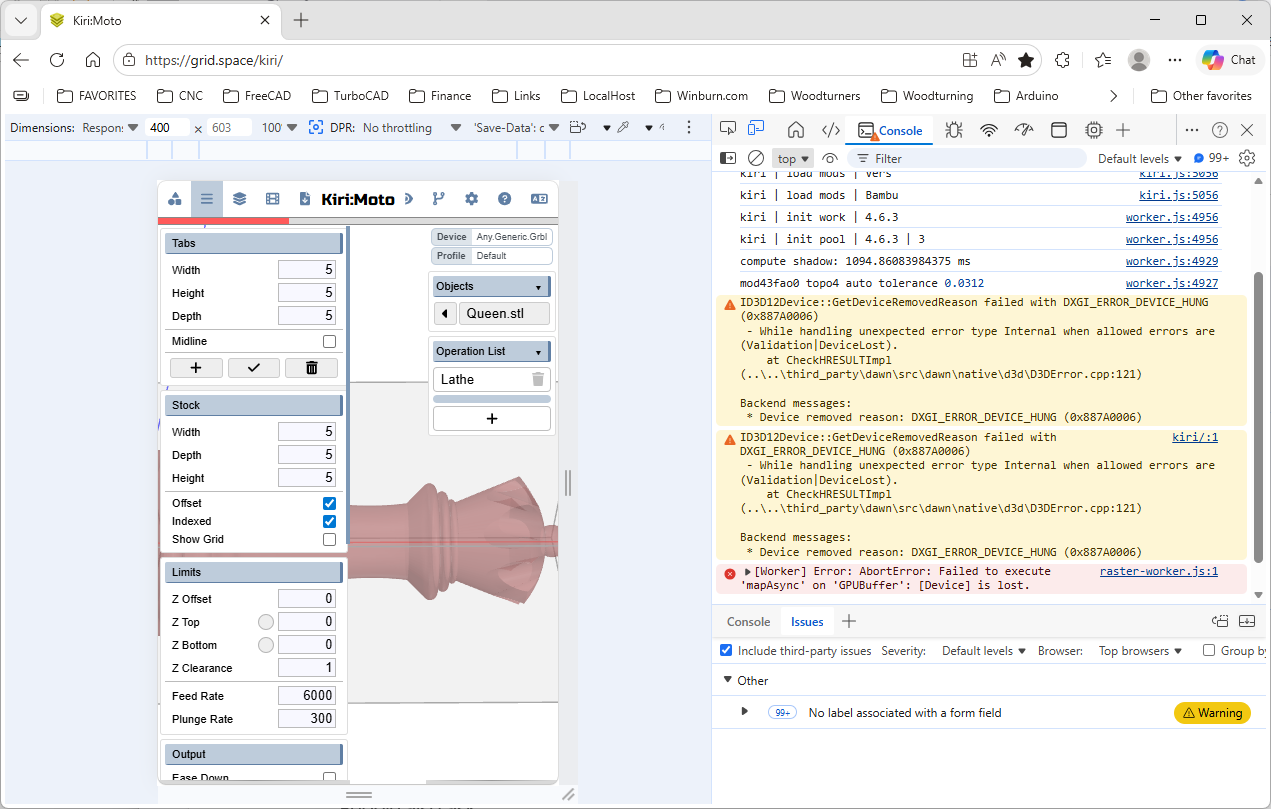
it’s showing an error with the driver and webGPU that’s beyond my control. it’s in the operating system driver.
OK, thanks Stewart. I’ll continue to work with Paul’s LatheEngraver software and decide where to go from here.
I just downloaded DeskProto Multi-Axis software, $300 for hobby license, may go that route.
Thanks,.
It may be cheaper to get a good GPU, if you are using a desktop computer that is… in a notebook it’s possible to change, but that’s a huge hassle, that’s more it is what it is…
I get a 30 day trial period for the DeskProto Multi-Axis, I’ve done two pieces and have one running on my machine now, still not cutting wood. I really like it, I’ll do the 30 day trial then decide which way to go.
Thanks for your help on this issue.
I am also new to Kiri:Moto and have a similar 4-axis setup. Have you tried using the CAM module with the rotary axis enabled? In the operation settings, set the tool orientation to follow the rotary axis for lathe-like cuts. The roughing pass should use a larger stepover and the finishing pass a smaller one. Hope this helps!