Again it is a convivence not a functional necessity, it would be nice if the KM tool file could be Exported and Imported as text. Makes editing easier. Selecting which tool file to use easier. Possibly an off line converted tool.km <> tool.txt.
A use argument:
Going from Ver 3 to Ver 4 we must change our drills from Taper to Drill. I have about 50 tools. One at a time is frustrating.
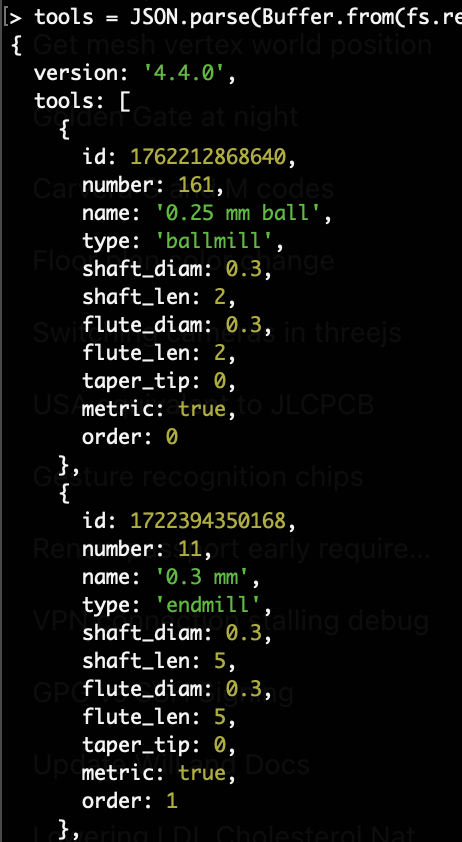
Hey, Mitch. When you use the tools export menu, it produces a .km file which is just a base64 encoded JSON string. You can parse it in node with a command like this:
let tools = JSON.parse(
    Buffer.from( fs.readFileSync(filename).toString(), 'base64')
);
then you can modify the resulting object/array and re-encode and re-import it in the same tool dialog.
Thank you for pointing the way. Not yet a js programmer. My History is with C and a tiny tiny bit of python. I can proceed with the knowledge you provided. Found the .msi and started installing node.js. Much is being installed with it.
Must apologize for this pushback. You have made an indescribably great contribution to the CAD community. Here is goes.
Thought you should know, CADers are unlikely to know JS. Might not even know how to spell JS or node. They/ we would need a simple to use converter. I think of a DOS or Windows executable. Maybe a run in you browser converter page.
I am inclined to offer to produce such. I cannot. It would be a deep rabbit hole for me.
mcdanlj:
Thank you for the alternate method. As a JS newbie, I typed jq in my windows DOS box. Got not found. I would need a large amount of study to get there. Thank you again for offering to assist.
As it happens I am working (when time permits) on a python program to manage my tool library. If it reaches a usable state I will share it with the community.
Thank you so very much. When might it be live on the Kiri:Moto (grid.space/kiri/) page? I am also a github neophyte. Looking at github I see the request for inclusion in version 4.5. Also see the code present in grid-apps/web/kiri/index.html and others. Hoped I could use your CSV option. before a next release. How might I do that?
Happy to make your experience a bit better. I know that there’s a dev server at https://dev.grid.space but as far as I know, only @stewart can push to that. the only other option I know is for you to run it locally with nodejs/bun. you can find instructions to do so here. The only diffference is that you’ll have to run git switch tool-csv to switch into the branch with updated code.