Hello! I just updated my project to use the 4.5 kiri API but i’m having some trouble getting the results i need. I’m pretty sure it’s a settings issue. I have a CAM roughing and outline pass, the outline pass seems to work ok, but the roughing pass goes to the full depth despite it being only a shallow pocket.
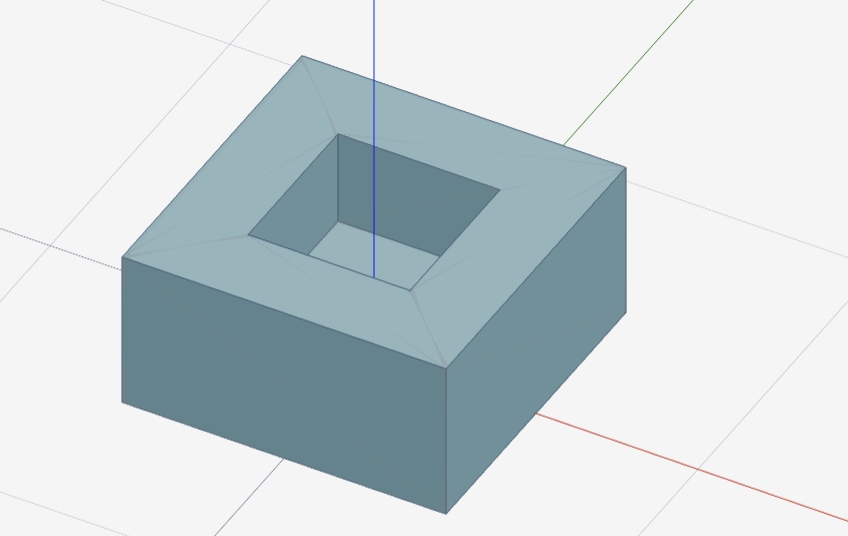
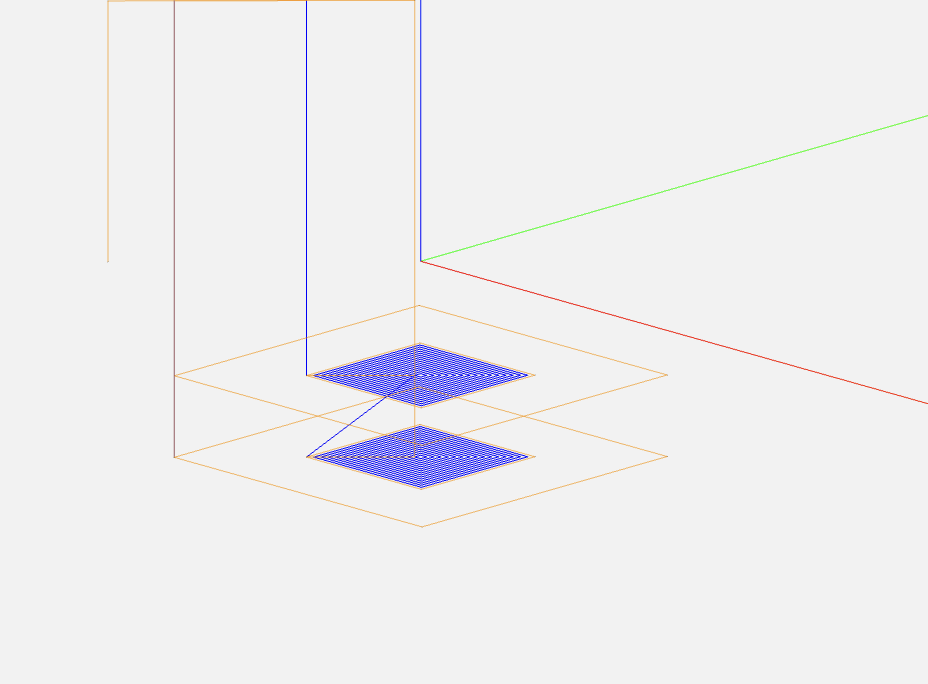
Here are the settings i’m using.
const STOCK_MARGIN = 5;
const CUT_THROUGH =  0; // Default cut-through thickness if not provided
const passes = 2
const speed = 1500
new Engine()
.setListener(display_message)
.load("https://raw.githubusercontent.com/alzatin/Test-dev-december-2/refs/heads/main/block_with_pocket.stl")
// should to call widget.setTopZ here ideally
 .then((eng) => {
      eng.widget.boundingBoxNeedsUpdate = true; // Ensure bounding box is updated
      //if (progressCallback) progressCallback(0.1); // 10% - STL loaded
      return eng.setMode("CAM");
    })
    .then((eng) => {
      //if (progressCallback) progressCallback(0.15); // 15% - Mode set
      const bounds = eng.widget.getBoundingBox();
      const z = bounds.max.z - bounds.min.z;
      return eng.setOrigin(0, 0, 0); // move part so top is at Z=0 (negate X to match coordinate systems)
    })
    .then((eng) =>
      eng.setStock({
        x: 3,
        y: 3,
        z: 0.1,
      })
    )
    .then((eng) => {
      // Determine if project uses metric units
      const projectUnits = "MM";
      const isMetric = projectUnits === "MM";

      return eng.setTools([
        {
          id: 1000,
          number: 1,
          type: "endmill",
          name: "endmill",
          metric: isMetric,
          shaft_diam: .25,
          shaft_len: 1,
          flute_diam: .25,
          flute_len: 2,
          taper_tip: 0,
          order: 5,
        },
      ]);
    })
    .then((eng) => {
      //if (progressCallback) progressCallback(0.25); // 25% - Tools set
      const bounds = eng.widget.getBoundingBox();
      const z = bounds.max.z - bounds.min.z;
      const zBottom = z; // ensure cut through stock bottom
      const down = 3;
      const camZBottom = -zBottom - CUT_THROUGH - 1;
      const roughingStepOver = 0.6;

      return eng.setProcess({
        camOriginTop: true,
        camOriginCenter: false,
        camRoughAll: false,
        camZOffset: 0,
        camZTop: -1, //top of stock
        camRoughFlat: true,
        camRoughIn: true,
        camRoughOmitThru: false,
        camRoughOmitVoid: false,
        camRoughOn: true,
        camRoughTop: false,
        camRoughVoid: false,
        camStockZ: 0,
        camEaseAngle: 10,
        camEaseDown: false,
        camZAnchor: "bottom",
        camDepthFirst: true,
        camZClearance: 3,
        camStockOffset: true,
        camZBottom: camZBottom, //-zBottom, // temp hack to get around setTopZ bug
        camToolInit: true,
        camOutlineSpeed: speed,
        camRetractFeed: 300,
        camSpindleSpeed: speed,
        camFastFeed: 6000,
        camFastFeedZ: speed, // Match Z feed to speed to maintain feedrate during ramp down
        ops: [
          {
            type: "rough",
            tool: 1000,
            spindle: 1000,
            down: down,
            step: roughingStepOver,
            rate: speed,
            plunge: speed,
            leave: 0,
            leavez: 0,
            all: false,
            voids: false,
            flats: true,
            inside: true,
            omitthru: true,
            ov_topz: 0,
            ov_botz: 0,
            ov_conv: false,
          },
          {
            type: "outline",
            tool: 1000,
            spindle: 1000,
            step: 0.4,
            steps: 1,
            down: down, // https://forum.grid.space/t/cam-kirimoto-api-help/2511/22
            rate: speed,
            plunge: speed, // Match plunge rate to XY feedrate for consistent speed during ramp down
            dogbones: false,
            omitvoid: false,
            omitthru: true,
            outside: false,
            inside: false,
            wide: false,
            top: false,
            ov_topz: 0,
            ov_botz: 0,
            ov_conv: true,
          },
        ],
      });
    })
    .then((eng) => {
      // Determine G-code units command based on project units
      const projectUnits =  "MM";
      const unitsCommand =
        projectUnits === "MM"
          ? "G21 ; set units to MM (required)"
          : "G20 ; set units to inches (required)";

      return eng.setDevice({
        mode: "CAM",
        internal: 0,
        bedHeight: 2.5,
        bedWidth: 678.18,
        bedDepth: 1524,
        maxHeight: 150,
        originCenter: false,
        spindleMax: 24000,
        gcodePre: [
          unitsCommand,
          "G90 ; absolute position mode (required)",
          "G0 F3000 ; set default rapid move feedrate",
          "G1 F1000 ; set default cutting feedrate",
        ],
        gcodePost: ["M05 ; spindle off", "M30 ; program end"],
        gcodeDwell: ["G4 P{time} ; dwell for {time}ms"],
        gcodeSpindle: ["M3 S{speed} ; spindle on at {spindle} rpm"],
        gcodeChange: [
          "M05 ; spindle off",
          "M6 T{tool} ; change tool to '{tool_name}'",
          "G37; get tool offset with ETS",
        ],
        gcodeFExt: "nc",
        gcodeSpace: true,
        gcodeStrip: false,
        deviceName: "Tormach.24R",
        useLaser: false,
      });
    })
    .then((eng) => {
      //if (progressCallback) progressCallback(0.5); // 50% - Process set
      // console.log(kiriEngine);
      //startSlicingProgress();
      return eng.slice();
    })
    .then((eng) => {
     // stopSlicingProgress();
     // if (progressCallback) progressCallback(0.9); // 80% - Slicing done
      return eng.prepare();
    })
.then(eng => eng.export())
.then(display_gcode);
The clearance also seems off, despite only being set to 3, it clears much higher. Setting the ztop to 0 doubled the amount of passes created and only setting it to a negative value seemed to get closer to giving correct results.
Any help would be greatly appreciated.