Hello! My first time here. I’m Keller, from Brazil.
I started a small business making products through laser cutting and I would like to thank for Kiri:Moto. My whole workflow is Android based and unfortunately there is not much software options for this platform, but Kiri:Moto makes it possible.
But recently I’ve been facing a small issue. I design my products and export it as svg, then I import it on Kiri:Moto. Here is my issue: closed objects are processed as normal, but open objects (like a simple line) just don’t appear and, consequently they are not in the g-code file.
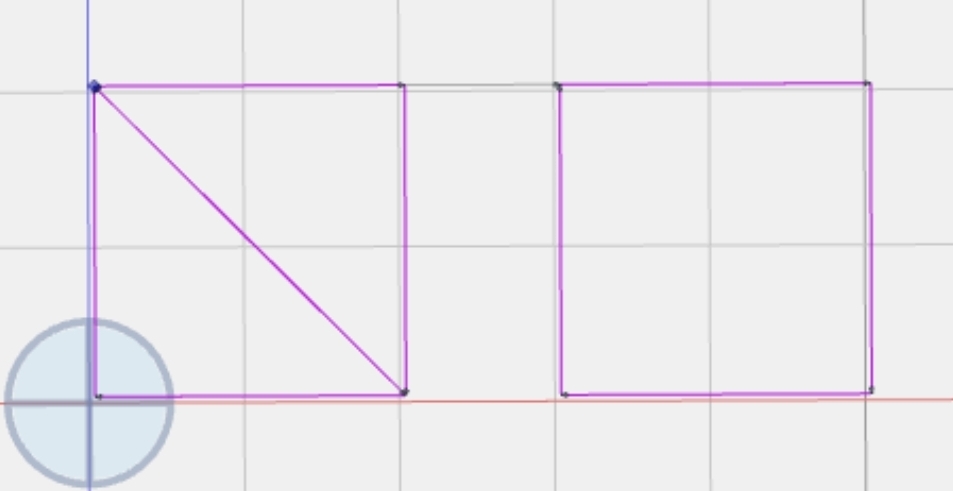
For example, I make a square and then I put a line in the middle to make it two triangles. Kiri:Moto will read it as a square.
To bypass it, instead of making a square then a line, I’m making two triangles and put them touching each other. It works, but it makes the laser travel this path twice. Not a problem at first, but for big projects and in the long term, it consumes some considerable time.
Here is an example, the left square is actually two triangles, the diagonal line will be cut twice, while the right one there was a line on the svg file that just don’t appear.
I usually get around it by making a square with a 0.1mm thickness, but it falls onto the double travel issue.
Is there a way to fix it? Maybe making Kiri:Moto recognize non-closed objects, or making it just avoid redundant paths.
Hi, Keller. I do not have a quick fix for this. Kiri’s engine is based on solid models, not open polylines. Is your laser using SVG output from Kiri or the gcode output? If gcode, then it may be possible to use a trace operation in cnc mode.
I’m not sure if this is your problem, but maybe making sure the nodes are connected will help? I’m not sure what SVG editing software you are using, but I know the free open source Inkscape vector graphics software has a node editor that you can use to make sure path nodes are joined.
However, you said your whole workflow is Android based, so I’m not sure if you can use Inkscape or not, but it has a Linux version so maybe? If not, perhaps whatever SVG editor you are using could help you make sure the nodes are joined? Total speculation, but maybe worth a try?
Hello! Thanks for answering.
At the moment my process is basically like this: import an svg file into kiri moto, make the basic adjusts like power and speed, then export it to g-code file. I’m using this method of making closed rectangles to mimic lines, then I use a g-code simulator to check the redundant paths and manually delete the lines. It works, but makes me quite vulnerable to typing mistakes, especially in cases where the line has a very complex shape.
Yeah, I tried it in many ways, like merging everything into one single object and similar things, it just not work. At the moment I use Grafika as my main vector tool. To bypass my issue with open lines, instead of drawing it normally, I make a thin rectangle with zero thickness, that makes Kiri process it quite as two lines, then I open the g-code on a simulator and scroll through the lines to find the redundant one and delete it. It works, but it’s not exactly the best way to deal with it.
There is an Inkscape third-party port to Android, I didn’t tested it yet once it’s paid, which makes not much sense once the original one is free, and some users complain that it’s not that android-friendly even with mouse and keyboard.