Hi Stewart,
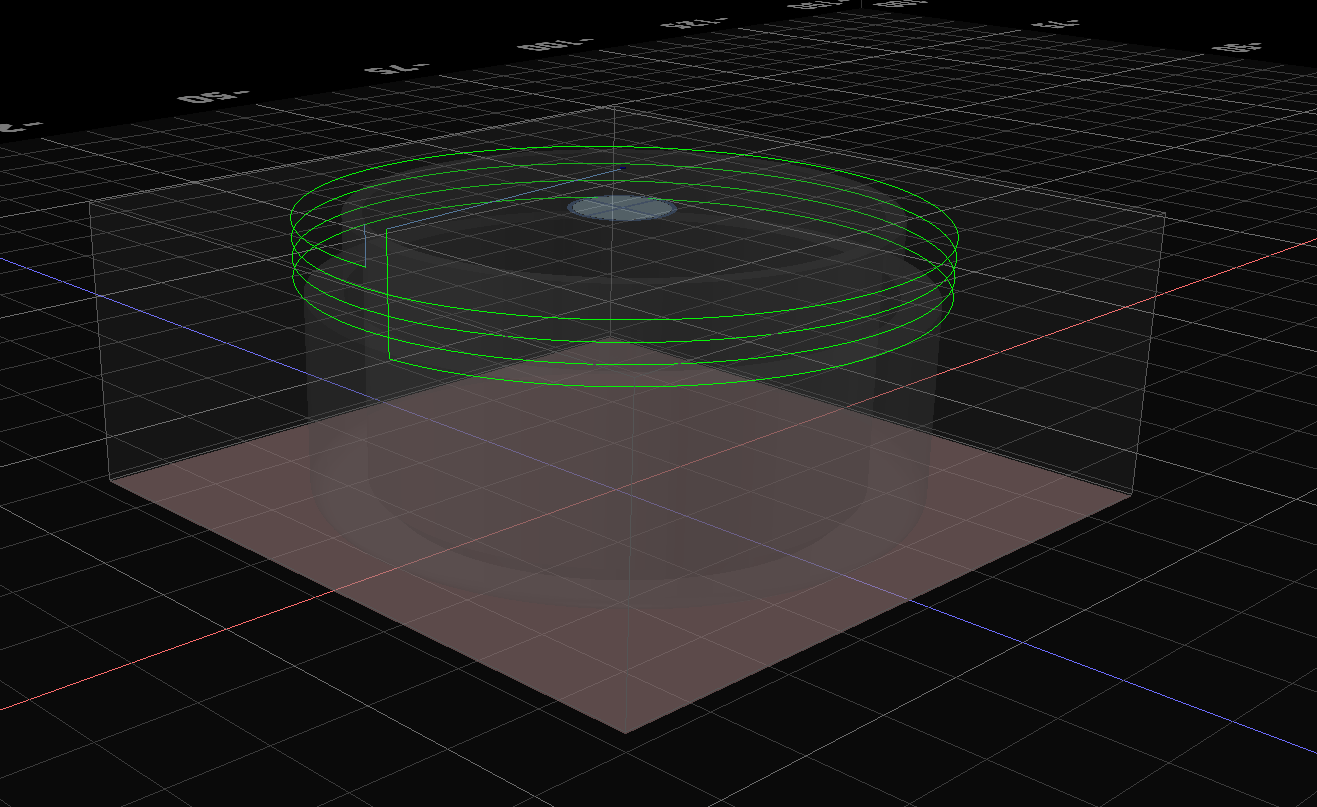
I’m trying to cut an outside thread on a round object using the Helical operation.
The helix itself is correct, but the entry move goes wrong:
Kiri moves the bit down to the cutting Z at the XY position of the first thread point, which means it plunges through the solid model to reach the start of the helix.
This destroys the outer surface before the thread is even cut.
Here’s the toolpath behavior:
-
Helix starts at the correct Z (bottom of the thread)
-
Helix moves upward as expected
-
But the initial plunge happens at the helix radius, not next to the object
-
So the bit travels through the wall to reach the start point
For inside threads, “enter from center” solves this, but for outside threads there is no equivalent option.
I cannot get the tool to approach next to the object and then start the helix.
Used workspace:
workspace_Krijtdoosje_buitenkant.kmz (614.1 KB)
Minor UX note:
The offset parameter changes the bit radius, not the helical radius.
For thread milling this feels counter‑intuitive, because to make a 0.25 mm lighter precut I have to calculate a new “virtual bit radius” instead of simply adjusting the helix radius directly.
Not a blocker, but it makes thread‑depth adjustments harder than necessary.
Hope this is enough info to pinpoint what’s happening.
Thanks for taking the time to look into it!
good notes. I did not realize that reverse caused it to cut up from the bottom. this is an error. also, there is a new feature on the dev server which is that entry and exit conditions are configurable separately meaning you can more easily cut exterior threads without the final pass cutting thru the thread.
I’ll discuss this with the author of that operation.
The reverse from down to up is very usefull to get a clean start of the thread on top, also I had to do that because at the end it goes straight up causing the same issue. so lets say you want thread for a part of the object it will damage the model.
check out the dev server for the updated entry/exit conditions and see if that helps
1 Like
Yes, nice, entry and exit conditions are exactly what I needed… you changed the reverse too so it starts from the bottom by default 
you changed the direction again with reverse while I was testing 
I think reverse is good from down to up, it’s a matter of opinion 
I’m always amazed at the speed and precision with which you fix things, Stewart. It’s honestly on another level.
I report bugs in a lot of software, but nobody responds and resolves issues as quickly as you do.
For comparison: I submitted five simple bug reports to Makera CAM — two updates later, nothing changed, and they even broke climb cutting.
Your ability to take feedback, understand the edge‑cases, and push fixes immediately is something I really appreciate.
1 Like
I haven’t changed the dev server code today.
!!! I’ve seen changes on the DEV server, I’ve tried this on the DEV server before I posted the topic (maybe I didn’t look good enough)… and while I was changing configuration of the helical I noticed the reverse changing… I’m flabbergasted… Oh well, this works like a charm, I can go on with my little project (too late to start milling though, dont want to wake up the neighbours)
use shift + reload when testing on the dev server to ensure you don’t get stale code. it’s not compact and served efficiently like the production server, so it’s possible to get small pieces of code out of date