Hello,
I have a problem that’s rendered Kiri:Moto completely unusable for me recently.
When i try to add a trace function to trace out a line, I can only select one segment of the line at a time. In the past, when I selected the line it selected the whole continuous segement. I don’t think that I changed any parameter before the first occurence of this bug. I use Kiri:Moto in the Onshape app if that helps.
The trace operation changed between 4.1 and 4.2 to use geometry based edge selection instead of z-constrained (flat) slices. This allows for traces that curve or move in z to be used. For the geometry we tested, this usually didn’t require more than 2-3 segments to complete a closed trace and allowed open trace for things like lettering. ctrl + selection still behaves the same and will select all matching trace lines matching in z.
If you can share your workspace or an Onshape document, I can look at how this affects your use case.
Similar problem here. I’ve shared my document in OnShape. Cannot select the text in the Well House sign for either tracing or pocketing. Ctrl drag does not work at all. Too cumbersome to select all the line segments, or letter depths individually.
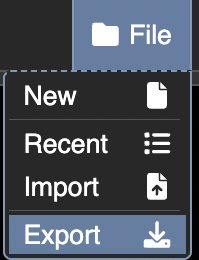
who did you share your document with? Onshape support? if you want to share it to an email address, use [ sa at grid dot space ]. but that will not give me your KM workspace settings. so using Kiri’s file → export and using something like limewire.com so share a link to the .kmz file here would be helpful. if you use limewire, the use # in their URLs, which is bad form and will not paste here properly, so quote the url or drop the https:// prefix when pasting.
I shared my OnShape document to the kiri:moto app within OnShape. My OnShape username is Kennywho and the document is Our Stuff.
I used to have your e-mail, but must have accidentally deleted it some time ago. You were trying to develop a way to create tool paths for my unique CNC lathe. I’ve dropped that project, and have bought a Carvera Air the I’m just beginning to learn about, Carvera CAM isn’t ready for prime time so I’m now learning kiri:moto within OnShape. I’ve used OnShape for a few years now.
Thanks for trying to meet my needs before.
in onshape you can share to an individual like this
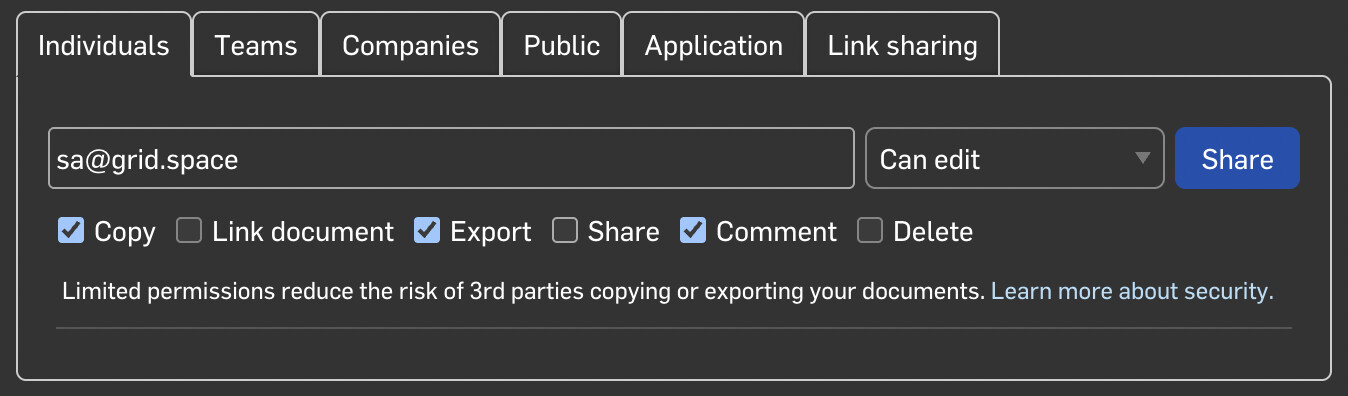
then in Kiri use files → export to create a workspace export and upload it to limewire.com and drop the link here
Also shared the document in Onshape
OK. So, why limewire? Couldn’t I have just shared it from my Onedrive?
Also, the Onshape document has the kiri workspace in the document. Could you use that?
The data in the K:M tab in Onshape is not part of the Onshape document
That’s funky! Looks just like the other tabs.
Learning, learning, learning - that’s living!
Just in case the other limewire isn’t working.
And to just test it, here’s the Onedrive link. workspace_Roof_Attached_Sign.kmz
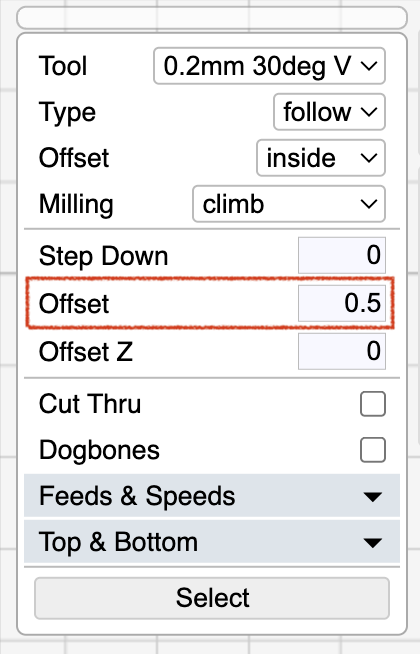
I modified your workspace. The trace had a mix over vertical and horizontal lines and some on different Z planes. This and the tool diameter (not fitting inside the letters) were defeating the algorithm.
I de-selected all traces the did a single ctrl + click on one lower letter segment which then selects all matching Z lines. Then I added an explicit inset offset of 0.5mm which fits the tip inside the letter wells. And then I added an outline cutout operation.
Roof_Attached_Sign_Trace.kmz (1.0 MB)
1 Like
Thanks. I’ll try this out for practice.


Well, after some trial and error, I was able to duplicate your solution from scratch.
Now I have no idea how to actually use the .nc files to run the Carvera Air, though I’m fixing to head out into the cold to my workshop to try.
Brrrrr!
Determined how to get the file loaded into the Carver Controller software. Did the z probing ok. Tried running the g code and the trace cutting was cutting air seemingly 3mm above the surface. The probing process used the machine’s wired probe to check its length then probed the surface of the stock which is 3mm thick. Started the KM code then the machine asked to change tools. Changed tool and the machine probed the length of the V tool and started running without probing the surface of the stock. So that’s probably why the KM code ran 3mm high. How does one fix that?
I think I found my mistake. Hadn’t noticed the Z top and bottom settings in the operations.
Z top and bottom are for limiting the operation range, not changing the origin. Do you have origin set to top? If so, the z=0 is top of stock. If you uncheck origin top then z=0 is bottom of stock and all cutting will appear too high by the thickness of the stock. When Carvera probes the top of stock, it’s for determining where the z=0 point is.
That’s it! This is almost as complicated as learning Creality 3D printing. I’ll get it eventually.
Back to it tomorrow.
Muchas Gracias!
Can’t get to my shop. Too icy, even on our porch. Not used to this in S Central Texas Hill Country. We’re near the top of a hill so too slick to even try to drive - would skid out of our driveway into the fence across the road.
My two shop cats are ok - shop is heated and they have plenty of food and water. Gonna be a full litter box when I do get out there! LOL
Safety first. We got far less than expected, but lots of ice.